Shadows, Mirrors, and Metadata
I recall taking a picture of my shadow…
Life is a solitary cell whose walls are mirrors.
What happened was, I was setting up a Windows box. I hadn’t had a chance to see my recent design fiddles in IE, so I fired it up and took a peek. For no particular reason that I can recall, I clicked on the little “GEO URL” icon on the home page. From there I followed to the “PLINK - Norman Walsh link (what’s this, I wondered?).
Turns out, it’s “people.link”, a site that’s aggregating FOAF data (I guess everyone’s getting into the build-a-community game).
Anyway, the only guy who claims to know meOr claimed at the time I saw that page, at least. I’m sure it’s subject to change as new FOAF data is incorporated is Johann Richard. That’s amusing in itself since I can’t place him (sorry Johann; I have a staggeringly bad memory for names, so it could easily be me).
Still with me? Ok. So, on Johann’s profile, there’s an interesting shadow picture.
I recall taking a picture of my shadow on one of my trips to England. This is where the metadata comes in: finding that photo in a collection of more than 6,000 digital snaps was painful. I carefully put metadata in the images on this site, but I haven’t been diligent about putting it in all my images. Boy, do I regret that.

What I’d really like at this point is an app that made it easier. I imagine a tool that let’s more store RDF fragments and make some sort of toolbar buttons out of them. Then it displays photos and let’s me highlight them and drag metadata onto them. (My gosh! I actually want a GUI app!)
The “glass-half-full” version of this story focuses on the fact that I found an unrelated image that I had forgotten about. It’s a “mirror picture” of me and my father taken at Blickling Hall:
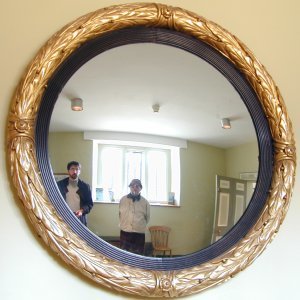
Here’s a similar feeling one I took yesterday:

Check out Infectious Photo Projects for more creative snaps.
Comments
> It’s a “mirror picture” of my father and I taken at Blickling Hall
Please, "my father and me" - you wouldn't say "a picture of I taken at...".
Sorry, I'm feeling draconian this morning :-)
Okay. The grammar police got me :-)
WRT the GUI metadata app, I'd really like that too! I've noticed that Photoshop 7 lets you store a lot of metadata, including caption, title, keywords and categories, but doesn't seem to be specifically using Dublin Core, which would be nice. It's also not a click and drag, and has taken me about twice as long to process my photos. I hope that the added metadata will come in handy at some future time, but have no idea how to search or extract the metadata I've already entered in each JPG. Do you have any tools or scripts to extract or search on this info?
I'm awful with GUIs (writing *and* using) but I did conclude that a graphical interface is what you want for captioning... BINS (sautret.org) is a photogallery tool that uses XML snippets for picture metadata (apparently much of the choice of XML was "UTF-8 means we get french accents to work for free" :-) and bins-edit-gui is a gtk-perl app that lets you browse a collection of pictures and add specific tags (and arbitrary new ones) to pictures. Pretty generic, the one "clever" feature is a key to auto-fill from the previous picture.
My current tool is a bit of emacs-lisp that uses (insert-image) and lets me build caption sets from emacs - I'm lazy and use an rfc-822 style caption file which then gets transmuted by a python script into the relevant XML (but that's what XML is all about - easy interchange...)
I'd love to see captioning tools that did even that well, with an open but still structured metadata format; popular tools like iPhoto don't even try...
Scptt:
Photoshop does use DC where appropriate, as well as its own vocab, via what it calls XMP. (An XMP SDK is actually released as open source.)
It treats any EXIF block as read-only, though will burn the appropriate general metadata (such as author, keywords) into the IPTC block. Then there is a big chunk of RDF, right there in the file header.
The "browse" feature of photoshop is a somewhat nice interface for adding e.g. keyword metadata... select an image, use the metadata pallete to enter appropriate fields, it automatically saves. I don't know of any nice tools for browse by metadata but I believe that's what F-Spot is focussing on.